
Download PresenTense Time Server – time server, NTP, SNTP, GPS, atomic clock, time synchronization, network time, accurate time, time management, Windows
Overview
PresenTense Time Server is a specialized Windows application engineered to deliver high-precision time synchronization across local and wide area networks. Designed for environments where time accuracy is critical, it serves as a reliable internal time source by leveraging atomic clocks, GPS receivers, and other reference time signals. The app addresses the common challenge of time drift in networked systems, which can disrupt operations in industries such as finance, healthcare, and IT infrastructure. By maintaining consistent and synchronized time across all connected devices, it reduces the risk of data inconsistencies, failed audits, and synchronization errors in time-sensitive applications.
Target users include system administrators, IT professionals, and organizations managing complex network infrastructures. It is particularly suited for enterprise environments requiring strict compliance with time accuracy standards. The developer, PresenTense Software, has positioned this tool as a robust solution for both small-scale deployments and large-scale network management. While the developer did not provide additional background on their history or product lineage, the app’s feature set reflects a focus on reliability and technical precision. Real-world use cases include synchronizing servers in data centers, ensuring accurate logging in security systems, and supporting time-critical operations in scientific or industrial settings.
Within the broader software ecosystem, PresenTense Time Server fills a niche role as a dedicated time management utility. It enhances network integrity by minimizing dependency on external time sources, offering a self-contained solution that remains functional during internet outages. This makes it a valuable asset in mission-critical and isolated network environments.
Key Features & Functionality
- NTP and SNTP Support: The application fully supports both Network Time Protocol (NTP) and Simple Network Time Protocol (SNTP), enabling accurate time distribution to clients across LANs and WANs. This ensures that devices such as servers, workstations, and networked equipment receive synchronized time data, reducing discrepancies in timestamps and logs.
- Hardware Compatibility: PresenTense Time Server integrates with a wide range of GPS and radio-based time hardware via serial or USB interfaces. This allows users to connect existing hardware clocks, enhancing flexibility and reducing the need for new equipment purchases.
- Free Run Functionality: In the event of internet disconnection or reference clock failure, the server maintains accurate time using its internal clock. This feature ensures uninterrupted timekeeping, which is essential in environments where continuous operation is non-negotiable.
- Automatic Configuration: Installation includes a streamlined setup process that automatically configures default time sources and server settings. This reduces the technical barrier for users, enabling rapid deployment without requiring deep expertise in time synchronization protocols.
- Error Notification System: The app features real-time alerts via email and SysLog when synchronization issues or hardware errors occur. Combined with COM port error handling and USB disconnect recovery, this ensures proactive issue detection and system stability.
For example, in a corporate IT environment, this tool can synchronize hundreds of devices across multiple departments. In a laboratory setting, it ensures that timestamped experimental data remains consistent and traceable. The combination of protocol support, hardware integration, and self-recovery mechanisms makes it a resilient solution for continuous time management.
Interface, UX & Performance
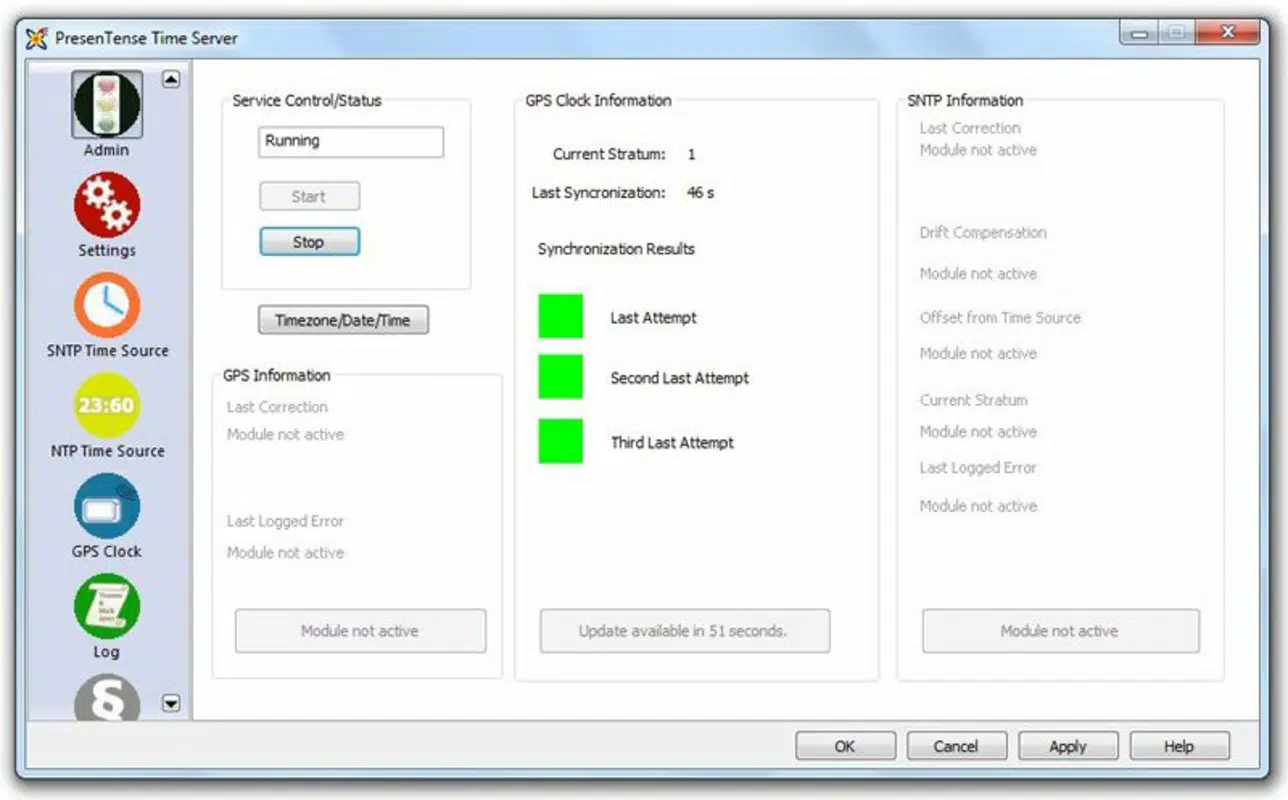
The user interface of PresenTense Time Server is designed with functionality and clarity in mind. It presents a clean, structured layout that allows administrators to monitor synchronization status, manage time sources, and configure server behavior efficiently. Navigation is linear and intuitive, with clearly labeled sections for settings, logs, and hardware connections. The visual style emphasizes readability and operational transparency, using color-coded indicators to reflect the status of time sources and client connections.
Although the developer did not list formal performance metrics, the app is reported to operate efficiently on standard Windows systems. It maintains responsiveness during high-traffic synchronization tasks and demonstrates stability under prolonged operation. The server handles multiple client requests without noticeable lag, suggesting optimized background processing. Users can expect consistent performance across different device categories, including desktops and virtual machines, provided the system meets baseline Windows requirements.
Responsiveness is maintained through efficient resource management, with minimal CPU and memory overhead. The error handling and recovery systems contribute to long-term stability, reducing the need for manual intervention. While specific benchmark data was not provided, the app’s design prioritizes reliability and uptime, which are essential for time-critical applications.
Platform Compatibility & Technical Requirements
PresenTense Time Server is designed exclusively for the Windows platform. It is compatible with modern Windows operating systems, though specific OS versions were not listed by the developer. The application requires a minimum of 11.5 MB of storage space, indicating a lightweight footprint suitable for both low-end and high-end systems.
Given the app’s reliance on hardware integration—such as GPS receivers and serial/USB devices—the developer did not specify minimum hardware or driver requirements. Compatibility with external time sources depends on the availability of proper drivers and system-level access to COM ports or USB interfaces. The developer did not provide detailed technical specifications, such as RAM or processor requirements, nor did they list any compatibility with non-Windows platforms.
Users should ensure their system supports the necessary hardware interfaces and has administrative privileges to configure network and serial port settings. While the app is designed for Windows, the lack of cross-platform availability limits its use to Windows-based environments.
Pros and Cons
Pros
- High-precision time synchronization using atomic clocks and GPS sources.
- Supports both NTP and SNTP protocols for broad client compatibility.
- Free Run functionality ensures time accuracy during internet outages.
- Automatic configuration simplifies setup for users with limited technical expertise.
- Real-time error notifications via email and SysLog improve system monitoring.
- Lightweight file size (11.5 MB) reduces system resource demands.
Cons
- Exclusive to Windows; no support for macOS, Linux, or mobile platforms.
- Specific OS and hardware requirements were not disclosed.
- Price point of $49.95 may be high for individual or small-scale users.
- Limited information on update frequency and long-term support.
- Requires external hardware for full functionality, which may increase total cost.
FAQ
Is PresenTense Time Server compatible with all Windows versions?
The developer did not specify which Windows versions are supported. Users should verify compatibility with their system before installation.
Can I use PresenTense Time Server without external hardware?
Yes, the app can function using internet-based time sources. However, full functionality—especially for high-precision or offline scenarios—requires compatible hardware such as GPS or radio clocks.
Is the app safe to install on a corporate network?
PresenTense Time Server is designed for enterprise use and includes security features such as access control and logging. As with any network service, proper configuration and firewall rules are recommended.
How often does the app receive updates?
Specific update frequency was not provided. Users should check the official website for the latest version and release notes.
Does PresenTense Time Server work offline?
Yes, the Free Run feature allows the server to maintain accurate time even without internet access or a reference clock, making it suitable for isolated or mission-critical environments.
Final Thoughts
PresenTense Time Server stands out as a reliable and technically sound solution for organizations that demand precise time synchronization across their networks. Its ability to integrate with GPS and atomic time sources, combined with robust error handling and automatic configuration, makes it a powerful tool for IT administrators. The Free Run capability ensures continuity during disruptions, which is vital in high-stakes environments.
While the app is priced at $49.95 and limited to Windows, its performance, stability, and feature set justify its cost for professional users. It is especially valuable in sectors where time accuracy impacts compliance, security, and operational integrity. For businesses managing complex networks or requiring strict time standards, PresenTense Time Server delivers measurable value.
Download PresenTense Time Server now


